
 YouHired
Understanding your Developer Dashboard: The Ultimate Command Center for Tech Careers in 2026
YouHired Team
Career & Product Experts
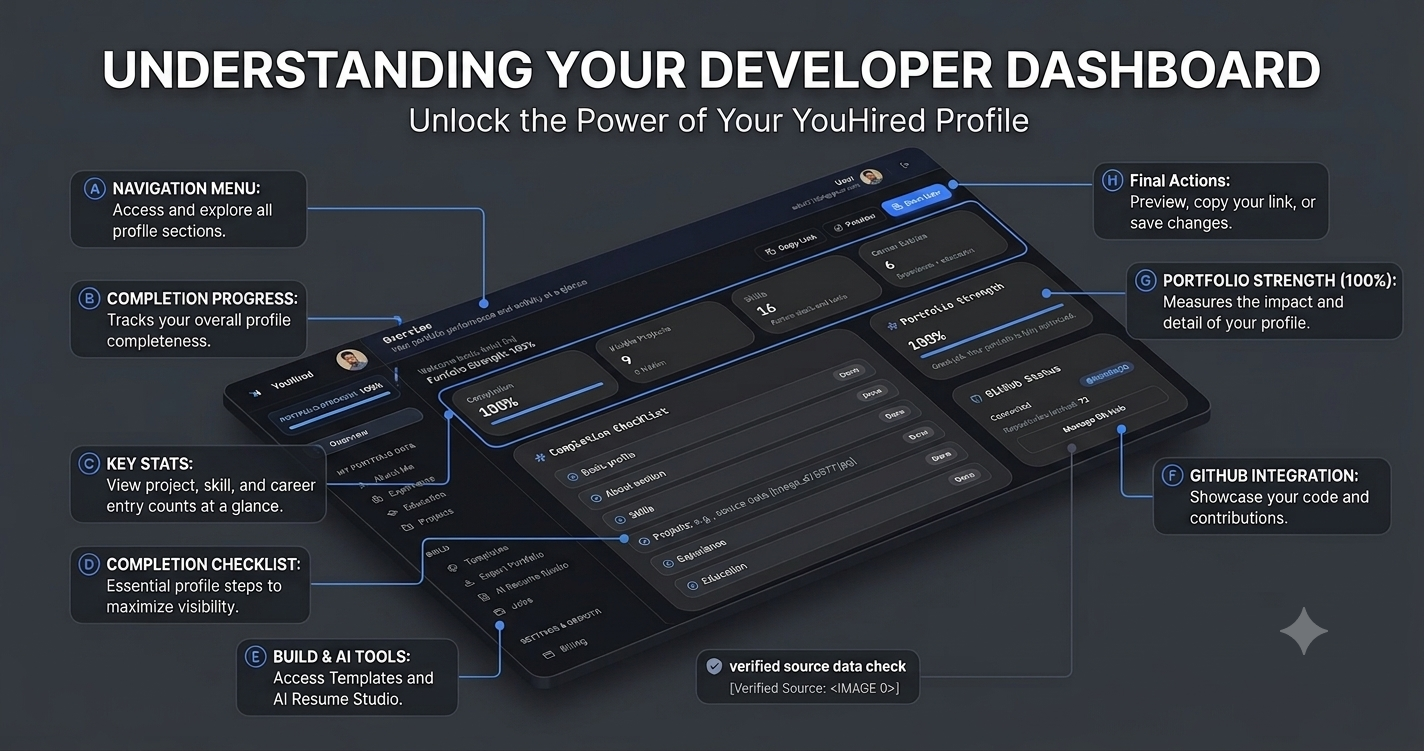
Understanding your Developer Dashboard: The Ultimate Command Center for Tech Careers in 2026
When you log into app.youhired.cloud today, July 21, 2026, you aren't just opening a static settings page. You are entering a high-performance career operating system designed specifically for the modern software engineer. Built on a robust stack of React 18, TypeScript, and Tailwind CSS, the YouHired Developer Dashboard utilizes Framer Motion to deliver a fluid, glassmorphism UI that feels less like a form and more like a modern IDE.
But beyond the sleek interface lies the true power of the platform: a centralized hub to build, deploy, optimize, and track your professional presence. Let’s dive deep into the core components of your dashboard and how to leverage them for maximum impact.
1. The Portfolio Hub: Instant Deployment & 14 Professional Templates
The heart of your dashboard is the Portfolio Builder. YouHired understands that different developers require different aesthetics—from the senior backend engineer who loves a Minimal Pro look to the creative frontend dev who needs the bold Creative Dev layout.
Your dashboard gives you access to 14 Professional Built-In Templates, including:
- Tech Stack: An IDE-inspired layout perfect for showing off your tools and systems architecture.
- DevOps Dark: A terminal-style theme tailored for SREs and DevOps engineers.
- Visionary Studio: A creator-grade premium brand for those aiming for executive roles.
- Mobile Dev: Specifically designed to showcase iOS and Android applications.
- And many more, including Enterprise, Open Source, and Data Forge.
Deep Customization Engine
Within the builder, you control the narrative. You aren't stuck with a rigid grid. The dashboard allows you to manipulate typography (choosing between Inter, JetBrains Mono, or Playfair Display) and select from 5 distinct Navbar styles like the Orbit Glass or the Command Bar. You can even swap out Hero sections on the fly, switching between a Spotlight view or a Bento grid depending on what you want to highlight.
1-Click Vercel Deploy & GitHub Integration
Gone are the days of fighting with Webpack configurations. When your portfolio looks perfect in the dashboard preview, simply hit the 1-Click Vercel Deploy button.
By connecting your Vercel account via OAuth, YouHired uses Vercel Edge Functions to provision and deploy your portfolio in seconds. You don't even need to touch the terminal (unless you want to—the DevOps Dark template would approve). The dashboard will instantly return a live production URL.
Prefer manual control? Use the Manual Export feature to download a ZIP file containing your HTML, CSS, and JS, ready for Netlify, Surge, or GitHub Pages. Plus, with GitHub Full Integration, the system auto-imports your repositories to generate rich project cards instantly, saving you hours of copy-pasting.
2. The AI Resume & ATS Command Center
Your dashboard also houses the Resume & ATS suite. In 2026, resumes are rarely read by humans first—they are parsed by bots. YouHired levels the playing field.
The AI Resume Builder takes your existing profile data and generates optimized, ATS-friendly resumes. It enforces metrics-driven bullet points, transforming vague descriptions like "worked on backend" into specific achievements like "optimized API latency by 40% using Express and MongoDB caching."
The Free ATS Resume Checker & Roast
This is where the dashboard gets fun. Upload your current PDF resume, and our engine parses the text to give you a strict score (0-100). But it doesn't just give you a number; it provides a sharp, funny, and brutally honest "AI Roast."
The checker specifically flags missing industry keywords (like CI/CD, Docker, or Kubernetes) and formatting errors that cause applicant tracking systems to reject your application. It turns the tedious task of resume proofing into an engaging feedback loop.
3.The Smart Job Matcher
YouHired isn't just a builder; it's an intelligence platform.
No need to leave the dashboard to hunt for jobs. The Job Matcher provides a weekly feed of engineering roles intelligently matched to your profile. It isn't guessing; it looks at your exact tech stack (defined in your portfolio), your resume content, and your GitHub repositories to serve you roles you are actually qualified for.
Conclusion
Your Developer Dashboard at YouHired is more than a collection of tools—it is a career accelerator. From the Tech Stack template to the AI Roast and the Vercel Edge Function deployment, every feature is engineered to automate the boring stuff so you can focus on writing code and building systems. Log in today, customize your Orbit Glass navbar, and deploy your future.